Pibcremental Controls Guide
Pan, zoom, click, and hold—keep every building and event in reach as the tree grows.
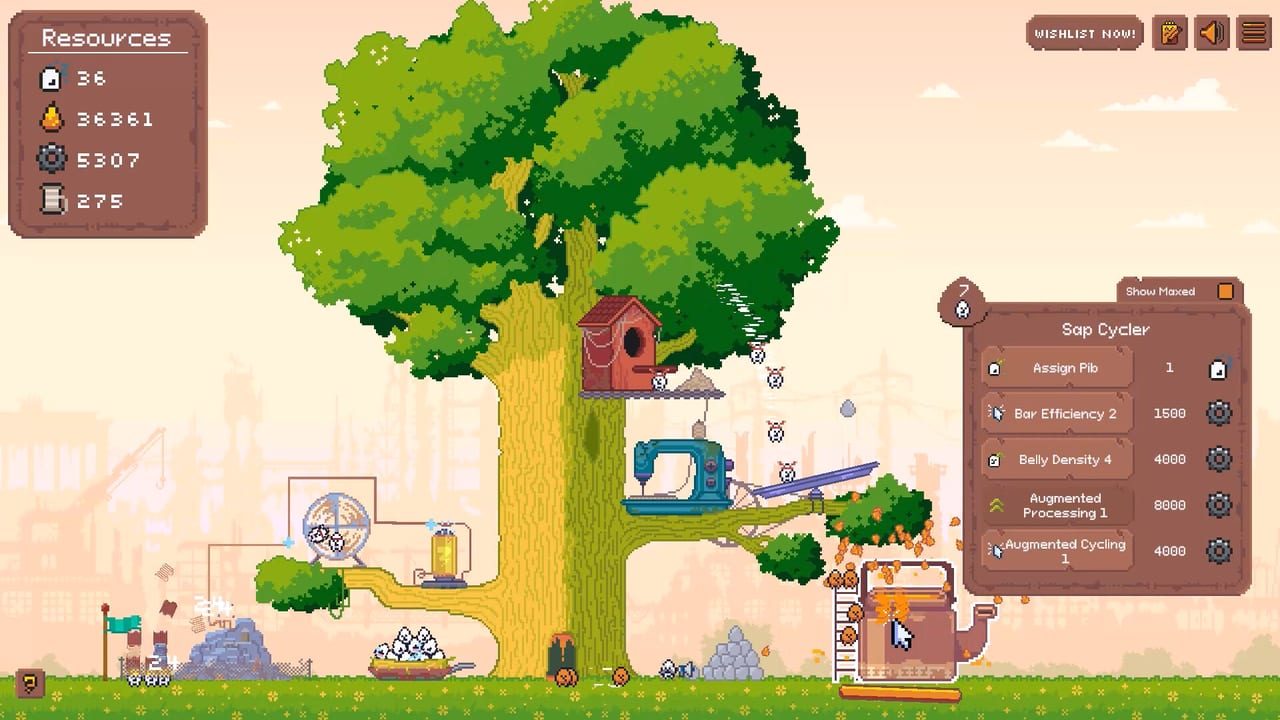
Pibcremental’s tree gets tall, busy, and delightfully cluttered. Good controls habits matter as much as upgrade order once buildings sprawl across branches. This page documents the core PC camera and interaction model—right mouse button or arrow keys / A–D to pan, scroll to zoom, and click or hold on buildings to manage production—so you never lose a sap cycler pop or event prop behind the canopy.
Use this reference beside Getting Started during your first hour, and return whenever a new tree grow dumps unfamiliar structures off-screen. For what to do after you click a building, see Resources & Buildings.
Camera movement
Pan the camera with:
- Right mouse button (RMB) drag across the world, or
- Arrow keys, or
- A / D (and related horizontal keys depending on your layout) for side-to-side travel along the tree.
Vertical exploration matters once grows stack branches upward. Combine gentle RMB drags with arrow taps when you need precise framing on a single building. Large flicks help after a grow when you are scouting for brand-new structures; small nudges help when an event highlights a specific prop.
If the camera feels sticky, release RMB fully before starting a new drag, and avoid fighting the mouse while also holding a building interaction. Separate “look” from “act” into short gestures: pan, release, click.
Zoom
Use the mouse scroll wheel to zoom in and out.
- Zoom out after tree grows to locate new quirky buildings and to spot sap cycler ore or event markers.
- Zoom in when assigning Pibs, reading building multipliers, or clicking dense UI on a single structure.
- Mid zoom is best for routine play: wide enough to see cycler timing, tight enough to click accurately.
A practical loop after every grow: zoom out → pan across new branches → mark the buildings you will staff → zoom in on the first target → assign. That thirty-second ritual prevents “I grew the tree and cannot find the new factory” syndrome.
Clicking and holding buildings
Click buildings to interact, open their management, and apply burst actions. Click and hold when the game expects sustained interaction—boosting generation, charging a control, or repeating a gather action without spamming discrete clicks. Early on, active clicking is a major sap source, especially once tech upgrades raise sap-from-clicking (for example 1→2). Holding can keep pressure on a building while you watch a nearby timer.
Tips:
- Prefer deliberate clicks on ore bubbles and event objects—miss-clicks on decorative Pibs waste the moment.
- When restaffing, click the building first, then adjust assignments before panning away.
- If a relic boosts a building (Events & Relics), keep that structure framed while you hold-click and dump workers into it.
- After prestige (Prestige Guide), rebuild muscle memory: buffs change how long you need to stay on a building before the next pan.
Suggested control workflow by task
Claiming sap cycler ore (~5 minute bubble): zoom out one notch, pan until the condensed sap ore is centred, click to break it for the sap explosion, then pan back to your upgrade panel or main building.
After a tree grow (~800 sap for the first one): zoom out fully enough to see new silhouettes, pan the trunk and branches, zoom in on each new building, click to inspect, assign Pibs, then continue.
During an event: pause long RMB pans, locate the event focus with arrows for precision, click required objects, slot any relic, restaff, resume normal camera distance.
Idle return via Steam Cloud: on launch, zoom out, scan for pending ore or event UI, resolve clicks, then settle into your usual mid zoom for assignment checks.
Accessibility and comfort
You can mix input styles. Some players pan almost exclusively with arrows / A–D and reserve the mouse for clicks; others RMB-drag constantly and barely touch keys. Either is fine—consistency beats speed. If your hand tires from hold-clicking, lean harder on passive upgrades and assigned Pibs so income continues while you rest between cycler pops. Pibcremental is a cozy single-player idle game; the controls should serve long sessions, not punish them.
Short breaks work well with the cycler timer: stretch during the wait, return to click ore, then idle again. Cloud saves on Windows 10+ keep progress safe between sessions.
UI clarity as the tree climbs
Height and clutter increase together. Habits that scale:
- Recentre the camera on Papa Pib’s original area only when you need a landmark; otherwise navigate by resource buildings you actually staff.
- After unlocking scrap and silk lines, invent a mental map—sap left, scrap mid, silk high, or whatever matches your tree’s layout—and pan along that route every minute.
- When multiplier bars matter for prestige planning, zoom in far enough to read them before you decide to reset.
- Keep the Guides Hub bookmarked outside the game so you are not hunting wiki tips while an event timer runs.
Controls and strategy overlap
Controls are not “just UX.” Missing a cycler because you were zoomed too far into a silk hut costs real sap. Missing an event building because you never zoomed out costs relics. Prestige timing depends on seeing whether wishing star UI is still active. In that sense, camera literacy is part of optimisation—the same category as assignment routing and upgrade order.
Whenever a guide says “break the ore,” “staff the new building,” or “finish the event before prestige,” it assumes you can put that object under your cursor in seconds. Practice the pan/zoom/click triad until it is automatic.
Quick reference table
| Action | Input |
|---|---|
| Pan camera | RMB drag, arrow keys, or A–D |
| Zoom | Mouse scroll wheel |
| Select / boost building | Click |
| Sustained building interaction | Click and hold |
| Find new content after grow | Zoom out, pan, then zoom in to assign |
| Claim sap ore | Centre ore, click to break |
What to read next
- Getting Started — apply controls to the first-hour checklist
- Resources & Buildings — know which building to click toward
- Events & Relics — track pop-ups without losing them off-screen
- Prestige Guide — scan for wishing star UI before you reset
- Guides Hub — all tutorials in one place
Master the camera early and the rest of Pibcremental’s chaos becomes readable. The tree can grow to the sky—you just have to keep the lens moving with it.
Frequently Asked Questions
Quick answers about Pibcremental progression, prestige, and resources.
How do I move the camera in Pibcremental?
Pan with right mouse button drag, the arrow keys, or A–D. Use whichever feels comfortable; many players mix RMB for large moves and arrows for fine adjustments.
How do I zoom?
Scroll the mouse wheel. Zoom out to find new buildings, sap ore, and events; zoom in to assign Pibs and read building details.
Should I click or hold buildings?
Click for selections and discrete actions such as breaking sap ore. Click and hold when you need sustained interaction to boost or charge a building’s action.
What should I do with the camera after growing the tree?
Zoom out, pan across new branches to spot unlocked buildings, then zoom in on each one to assign Pibs and buy related upgrades.
Do controls change after prestige?
Inputs stay the same, but faster post-prestige openings make quick pan/zoom habits more valuable so you can restaff and claim ore without delay.